
Turn Your Stream Into an Interactive Experience
Let your community use Bits to request and vote what they want to see. You decide what happens.
No credit card required • Set up in 5 minutes
Simple for You, Powerful for Your Community
Three steps to transform your stream into an interactive experience
Viewer Creates a Request
Viewers submit requests using Twitch Bits (you set the minimum amount)
Community Votes with Bits
Other viewers add Bits to requests they want to see, pushing them to the top
You Decide What Happens
Accept requests from your dashboard, complete them live, and watch engagement soar
You're always in control—set guidelines for what you will/won't do
Everything You Need to Engage Your Community
Powerful features designed for streamers who want more from their audience
Real-Time Dashboard
View all requests as they come in. Accept, reject, or queue for later. Add completion notes.
Smart Queue System
Active request shown to viewers. Queued requests automatically promoted. Automatic expiration handling.
Transparent Voting
Viewers see total Bits on each request. Fair ranking by community support. All contributions tracked.
Full Control
Set minimum Bits requirement. Configure request duration. Define community guidelines.
Revenue Boost
Bits = direct revenue for you. Encourages repeat participation. Higher engagement = more subs/followers.
Analytics Dashboard
Track Bits over time. See request completion rates. Understand viewer behavior.
How It Works for Your Viewers
Create requests with Bits, or vote on existing ones to support the ideas they want to see come to life.
Watch as you fulfill the most-voted requests live on stream.
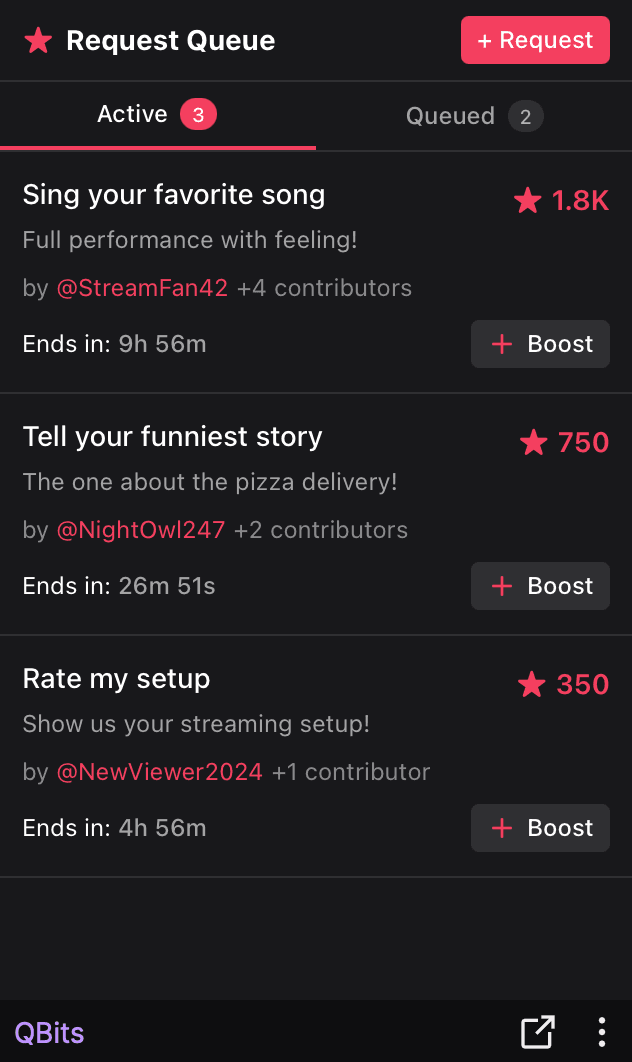
A Dashboard That Makes Sense
Clean, intuitive interface designed for streamers who are busy creating content
Live Request Queue
See all requests in real-time
One-Click Accept/Reject
Make decisions instantly
Real-Time Bits Tracking
Watch revenue grow live
Free to Use, Easy to Install
No subscription fees, no hidden costs. Just pure community engagement.
Free for Streamers
- Unlimited requests
- Real-time dashboard
- Analytics & insights
- Full customization
- All future updates
*Standard Twitch revenue share applies to Bits
Frequently Asked Questions
Everything you need to know about QBits
QBits uses Twitch Bits, which require Twitch Affiliate status or higher. If you're not an Affiliate yet, check Twitch's Affiliate Program requirements.
Sign up for the dashboard with your Twitch account, then install the QBits extension from the Twitch Extensions directory. It takes less than 5 minutes.
Absolutely. You set minimum Bits, request duration, and community guidelines. You can reject any request you're not comfortable with.
You can reject requests at any time with an optional note. Transparency is key—your community will understand.
You set the duration (default 30 minutes). When an active request expires, it returns to the queue automatically.
No, Bits are non-refundable per Twitch policy. Be clear in your guidelines about what you will/won't do.
Yes! QBits can coexist with other Twitch extensions as long as they don't occupy the same panel slot.
Yes, visit our discord. We're here to help!
Ready to Level Up Your Stream?
Join streamers who are turning viewers into active participants and boosting engagement like never before
No credit card required • Set up in 5 minutes